Login or create new account.

By registering on joomprod.com, you will have immediate access to all our free products and to the public side of our support forum.

Enjoy our subscriptions.

Each of our subscriptions allow you to enjoy the private side of the support forum and all the update of our products for a period ranging from 3 months to 1 year.

Payment And immediate download.

After subscribing to one of our subscription, the products are immediately downloadable.

Login

Or Register
Accueil / forum / Public Forum / Main Forum / Create new position in edit field

Support Availability Because we must sleep sometimes

Working days: Monday to Friday.
Reply time: Depending on the complexity of your support issue it's usually between a few hours to 48 hours.

Support is only guaranteed to paid subscribers

AdsManager - End of life

It is with great regrets that we have chosen to end the developpement of Adsmanager and its other associated components.

AdsManager is born 10 years ago and, as of today, the number of new subscriptions and downloads have fallen and we cannot maintain the component anymore.

All active subscribers will be able to continue enjoying support until the end of their subscription.

The components will be free and no support will be provided anymore for the other users.

×

Notice

The forum is in read only mode.

× OLD Forum post could be checked here : forum.joomprod.com

Create new position in edit field
More
12 years 4 months ago #5713 by Paco01
Create new position in edit field was created by Paco01
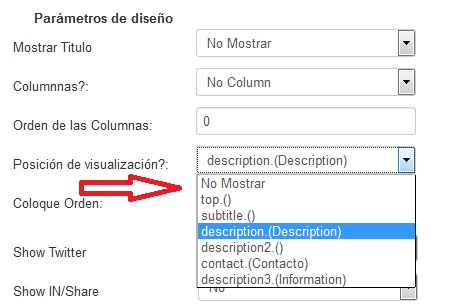
hello, I want to create a new position in edit field, so you can place a field there, I have tried to modify the html / com_adsmanager / details / default.php file albeit unsuccessfully, I add photo ... thanks
Attachments:
More
12 years 4 months ago #5727 by tompap
Replied by tompap on topic Create new position in edit field
After adding a value in field_positions like you did

You need to copy the block in the default.php
if (isset($this->fDisplay[5]))
				{		
					foreach($this->fDisplay[5] as $field)
					{	
						$c = $this->field->showFieldValue($this->content,$field); 
						if(($c !== "")&&($c !== null)) {
							$title = $this->field->showFieldTitle(@$this->content->catid,$field);
							if ($title != "")
								echo "<b>".htmlspecialchars($title)."</b>: ";
							echo "$c<br/>";
						}
					} 
				}

You just need to replace fDisplay[5] by fDisplay[anothernumber]
More
12 years 4 months ago - 12 years 4 months ago #5740 by Paco01
Replied by Paco01 on topic Create new position in edit field
I recommended, but I see the new position, in the display settings ads appear the following positions:

ADSMANAGER_POSITION_TOP
ADSMANAGER_POSITION_DESCRIPTION2
ADSMANAGER_POSITION_DESCRIPTION
ADSMANAGER_POSITION_SUBTITLE
ADSMANAGER_POSITION_DESCRIPTION3
ADSMANAGER_POSITION_CONTACT
(..................................)???

as I add the new position?
thanks
Last edit: 12 years 4 months ago by Paco01.
More
12 years 4 months ago #5741 by tompap
Replied by tompap on topic Create new position in edit field
the name ADSMANAGER_POSITION is a column of the position table, you can write directly the "description" in your language, or just a define like ADSMANAGER_POSITION_X and add the tag in your language. This is only needed if you need your admin is several language.
More
11 years 8 months ago #10034 by catalinads
Replied by catalinads on topic Create new position in edit field
I have added a new position.
I inserted the block in php. I see exactly as i want in details view.
I have a small problem.
I dont see it in : Adsmanager backend : Details view.
Is not necessary to see it there but the problem i have is next:
If i edit a field and i set the new postion ..it's working
But if i go to Details view to make some changes.. will reset my previous setting. I mean the fields assigned to that position will remain unassigned in left of the page where you can drag and drop them
More
11 years 8 months ago #10035 by catalinads
Replied by catalinads on topic Create new position in edit field
I have tried to edit positions.php from administrator... components.
i see it without title and is not saving the field i drag there
Moderators: perry
Time to create page: 0.550 seconds
Powered by Kunena Forum
