Login or create new account.

By registering on joomprod.com, you will have immediate access to all our free products and to the public side of our support forum.

Enjoy our subscriptions.

Each of our subscriptions allow you to enjoy the private side of the support forum and all the update of our products for a period ranging from 3 months to 1 year.

Payment And immediate download.

After subscribing to one of our subscription, the products are immediately downloadable.

Login

Or Register
Accueil / forum / Support / AdsManager Support / [RESOLVED] Google maps error

Support Availability Because we must sleep sometimes

Working days: Monday to Friday.
Reply time: Depending on the complexity of your support issue it's usually between a few hours to 48 hours.

Support is only guaranteed to paid subscribers

AdsManager - End of life

It is with great regrets that we have chosen to end the developpement of Adsmanager and its other associated components.

AdsManager is born 10 years ago and, as of today, the number of new subscriptions and downloads have fallen and we cannot maintain the component anymore.

All active subscribers will be able to continue enjoying support until the end of their subscription.

The components will be free and no support will be provided anymore for the other users.

×

Notice

The forum is in read only mode.

[RESOLVED] Google maps error

More
10 years 5 months ago #20158 by sanida
The following user(s) said Thank You: adarr
More
10 years 5 months ago - 10 years 5 months ago #20164 by marinship
Replied by marinship on topic Google maps error
Bonjour,

je rencontre le même problème depuis quelques jours.

Lorsque le marqueur affiche une annonce unique, il est parfaitement visible, comme à l'origine.
Lorsque le marqueur désigne plusieurs annonces (exemple : France 445), seul le nombre d'annonces est visible et dans des couleurs pas toujours évidentes à l'écran ; vous trouverez un exemple sur la page :
www.boat.fr/index.php/bateaux-a-moteur/toutes_les_annonces

En fait il faut zoomer au maximum pour retrouver le marqueur typique de Gmap.

Bien cordialement,
RM
Last edit: 10 years 5 months ago by marinship.
The following user(s) said Thank You: adarr
More
10 years 5 months ago - 10 years 5 months ago #20168 by bienenf
Replied by bienenf on topic Google maps error
Bonjour,

Le soucis est aussi récent sur www.modelisme.com/annonces/toutes_les_annonces.html

Affichage de certaines occasions, et chiffre sans le "fond coloré",

meme comportement que les sites ci-dessus,

merci d'avance
Yves
Last edit: 10 years 5 months ago by bienenf.
The following user(s) said Thank You: adarr
More
10 years 5 months ago #20174 by marinship
Replied by marinship on topic Google maps error
Bonjour,

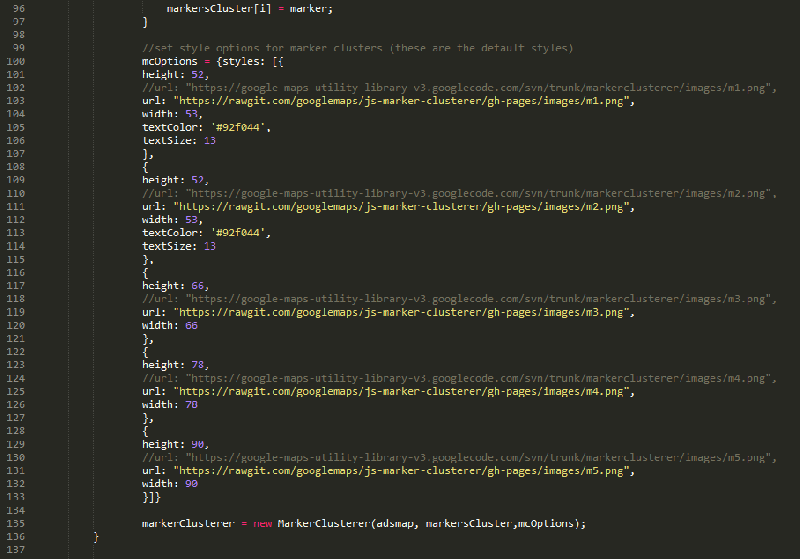
effectivement le comportement du marqueur est le même. Il semble que cela provienne de la librairie Google-maps v3 dans laquelle l'image 'm2.png' reste introuvable, voir ci-dessous :
"google-maps-utility-library-v3.googlecod...sterer/images/m2.png"

Une solution rapide serait de pointer vers la nouvelle URL mais je n'ai rien trouvé sur le Net à ce sujet ... :(
The following user(s) said Thank You: adarr
More
10 years 5 months ago #20175 by marinship
Replied by marinship on topic Google maps error
Bonsoir,

voilà, j'ai trouvé une information selon laquelle la librairie Google-maps a bien été déplacée.

En attendant une autre solution que proposera surement JOOMPROD, j'ai modifié les URL des marqueurs.
Pour cela je suis allé dans mes 'Overrides' MonSite\templates\MonTemplate\html\mod_adsmanager_adsmap\default.php et j'ai modifié les lignes comme ci-dessous dans la function loadMarkers(markers) :


Bien cordialement B) ,
RM
Attachments:
The following user(s) said Thank You: sanida, adarr, wtorbeyns, Archi
More
10 years 5 months ago - 10 years 5 months ago #20176 by sanida
Replied by sanida on topic Google maps error
Marinship,
Merci beaucoup! Il fonctionne!
:) :)
<3 <3
Last edit: 10 years 5 months ago by sanida.
The following user(s) said Thank You: adarr
Time to create page: 0.060 seconds
Powered by Kunena Forum