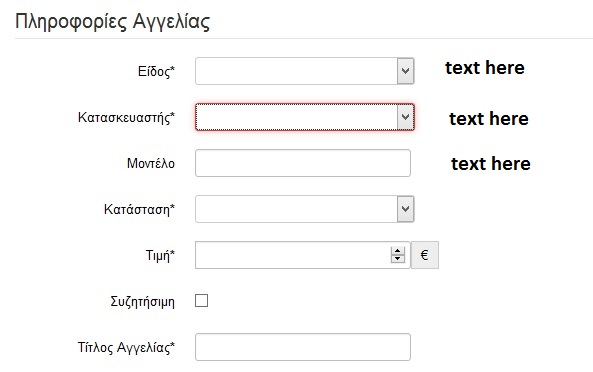
Hello,
The easy way isn't really clean but it will work.
In the override of the edit file (the original file is located in components/com_adsmanager/views/edit/tmpl/default.php), you will find a few iterators where the position must be displayed.
In those iterators, you must modify this code:
<?php
		foreach($this->fields as $field)
		{
			if (@$field->options->edit_admin_only == 0) {
				$fieldform = $this->field->showFieldForm($field,$this->content,$this->default);
				if ($fieldform != "") {
                                    echo "<div id=\"row_".$field->name."\" class=\"span12\">";
                    echo "<div class=\"control-group\">";
                    if ($field->required == 1)
                    	$requiredtxt = JText::_('ADSMANAGER_REQUIRED');
                    else
                    	$requiredtxt = "";
                    if(!isset($field->options->display_edit_title) || $field->options->display_edit_title == 1){
                    if ((@$field->description)&&($field->description !="")) {
                    	JHTML::_('behavior.tooltip');
                    	echo "<label class=\"control-label\" for=\"{$field->name}\">".
                    		 JHTML::tooltip(TText::_($field->description),TText::_($field->title),null,$this->field->showFieldLabel($field,$this->content,$this->default).$requiredtxt).
                    		 "</label>";
                    } else {
						echo "<label class=\"control-label\" for=\"{$field->name}\">".$this->field->showFieldLabel($field,$this->content,$this->default).$requiredtxt."</label>";
					}
                    }
					echo $fieldform;
                    echo "</div>";
                                    echo "</div>";
				}
			}
		}
		?>
Like this one:
<?php
		foreach($this->fields as $field)
		{
			if (@$field->options->edit_admin_only == 0) {
				$fieldform = $this->field->showFieldForm($field,$this->content,$this->default);
				if ($fieldform != "") {
                                    echo "<div id=\"row_".$field->name."\" class=\"span12\">";
                    echo "<div class=\"span9\">";
                    echo "<div class=\"control-group\">";
                    if ($field->required == 1)
                    	$requiredtxt = JText::_('ADSMANAGER_REQUIRED');
                    else
                    	$requiredtxt = "";
                    if(!isset($field->options->display_edit_title) || $field->options->display_edit_title == 1){
                    if ((@$field->description)&&($field->description !="")) {
                    	JHTML::_('behavior.tooltip');
                    	echo "<label class=\"control-label\" for=\"{$field->name}\">".
                    		 JHTML::tooltip(TText::_($field->description),TText::_($field->title),null,$this->field->showFieldLabel($field,$this->content,$this->default).$requiredtxt).
                    		 "</label>";
                    } else {
						echo "<label class=\"control-label\" for=\"{$field->name}\">".$this->field->showFieldLabel($field,$this->content,$this->default).$requiredtxt."</label>";
					}
                    }
					echo $fieldform;
                    echo "</div>";
                    echo "</div>";
                    echo "<div class=\"span3\">";
                    switch($field->name) {
                        case 'ad_price': echo 'text ad_price';
                            break;
                        case 'ad_text': echo 'text ad_text';
                            break;
                    }
                    echo "</div>";
                                    echo "</div>";
				}
			}
		}
		?>
In the switch at the end of the last block, you can add as many field you want.
Please be aware that this code isn't clean at all but the cleaner code to do this is way to complex to publish it here.
And don't forget to do a backup of the edit file before doing some modifications.
Best regards.