Login or create new account.

By registering on joomprod.com, you will have immediate access to all our free products and to the public side of our support forum.

Enjoy our subscriptions.

Each of our subscriptions allow you to enjoy the private side of the support forum and all the update of our products for a period ranging from 3 months to 1 year.

Payment And immediate download.

After subscribing to one of our subscription, the products are immediately downloadable.

Login

Or Register
Accueil / forum / Support / AdsManager Support / [RESOLVED]Font size/position of price has changed

Support Availability Because we must sleep sometimes

Working days: Monday to Friday.
Reply time: Depending on the complexity of your support issue it's usually between a few hours to 48 hours.

Support is only guaranteed to paid subscribers

AdsManager - End of life

It is with great regrets that we have chosen to end the developpement of Adsmanager and its other associated components.

AdsManager is born 10 years ago and, as of today, the number of new subscriptions and downloads have fallen and we cannot maintain the component anymore.

All active subscribers will be able to continue enjoying support until the end of their subscription.

The components will be free and no support will be provided anymore for the other users.

×

Notice

The forum is in read only mode.

[RESOLVED]Font size/position of price has changed

  • nemgtr_webmanager
  • nemgtr_webmanager's Avatar Topic Author
  • Offline
  • Bronze
  • Bronze
More
11 years 9 months ago - 11 years 9 months ago #9123 by nemgtr_webmanager
[RESOLVED]Font size/position of price has changed was created by nemgtr_webmanager
Hello,
I have noticed that since I updated to 3.0.1 the font size and position of the ad price has changed. I'd like to get the price size back to the larger size. (I can live with position change).
I've read some of the forum entries about "inner menu" but I'm not a programmer so not much of it makes sense.
I can edit files but I don't know what file to edit and what I need to put in to get the price back so my users can see it.


I'd love to see this type of size selection be available in the Configuration or added to the field. Less edit issues that way.
Thanks for you help on this issue.
K
Last edit: 11 years 9 months ago by loic.
More
11 years 9 months ago #9130 by tompap
Replied by tompap on topic Font size/position of price has changed
Hello,

What was the previous version installed ?
Do you have link to see the errors ?
  • nemgtr_webmanager
  • nemgtr_webmanager's Avatar Topic Author
  • Offline
  • Bronze
  • Bronze
More
11 years 9 months ago #9133 by nemgtr_webmanager
Replied by nemgtr_webmanager on topic Font size/position of price has changed
Hi,
I'm pretty sure that it was correct in the 3.0.0 version and it was the way I wanted (Price in what was probably h1 style, flush right on screen) in the 2.x versions. I don't know exactly when it changed since I don't remember if I checked the ads in 3.0.0.
I noticed it the first time in 3.0.1. Sorry I don't have the exact change version. We've been using AdsManager for a few years now.

The link to our site is: www.nemgtr.org/index.php/members-home/vi...ieds/1-cars-for-sale
Scroll to the second ad on the screen. Some of our members don't use pricing in the ads so you'll have to scroll down to see the issue.
I'll look around and see if I have a screenshot of an ad from a previous version. The one attached is of the live 3.0.3 site.

Thanks,
K
Attachments:
More
11 years 9 months ago #9140 by tompap
Replied by tompap on topic Font size/position of price has changed
You can add in your template CSS:

.ad_price {
font-size: 16px;
font-weight: bold;
}
  • nemgtr_webmanager
  • nemgtr_webmanager's Avatar Topic Author
  • Offline
  • Bronze
  • Bronze
More
11 years 9 months ago - 11 years 9 months ago #9151 by nemgtr_webmanager
Replied by nemgtr_webmanager on topic Font size/position of price has changed
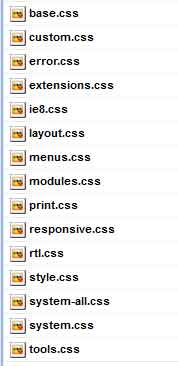
Thanks for the input. But I'm not a programmer so I'm not sure which file to put this code into. I've attached a list of files in the template/css folder that my site uses. Could you tell me which one I should put the edit into?
I know this isn't your job, but I'm not sure and can't risk taking the site down by bad edits.

Thanks,
K
OK I took a stab at this and managed to find the file (custom.css) to add the code. AND IT WORKED! No one is more surprised than I am that this is working. Thanks for all the help.....
Attachments:
Last edit: 11 years 9 months ago by nemgtr_webmanager.
More
11 years 9 months ago #9168 by loic
Replied by loic on topic Font size/position of price has changed
Good news.

I update the topic subject to resolved.

And just for information, you could have added the code inside any of those files, the css of the template is just one that will not be erased by the updating of a component :).

Best regards.
Time to create page: 0.755 seconds
Powered by Kunena Forum