Login or create new account.

By registering on joomprod.com, you will have immediate access to all our free products and to the public side of our support forum.

Enjoy our subscriptions.

Each of our subscriptions allow you to enjoy the private side of the support forum and all the update of our products for a period ranging from 3 months to 1 year.

Payment And immediate download.

After subscribing to one of our subscription, the products are immediately downloadable.

Login

Or Register
Accueil / forum / Support / AdsManager Support / image size issue

Support Availability Because we must sleep sometimes

Working days: Monday to Friday.
Reply time: Depending on the complexity of your support issue it's usually between a few hours to 48 hours.

Support is only guaranteed to paid subscribers

AdsManager - End of life

It is with great regrets that we have chosen to end the developpement of Adsmanager and its other associated components.

AdsManager is born 10 years ago and, as of today, the number of new subscriptions and downloads have fallen and we cannot maintain the component anymore.

All active subscribers will be able to continue enjoying support until the end of their subscription.

The components will be free and no support will be provided anymore for the other users.
×

Notice

The forum is in read only mode.

image size issue

More
11 years 11 months ago #8165 by jeannine
image size issue was created by jeannine
Hello.

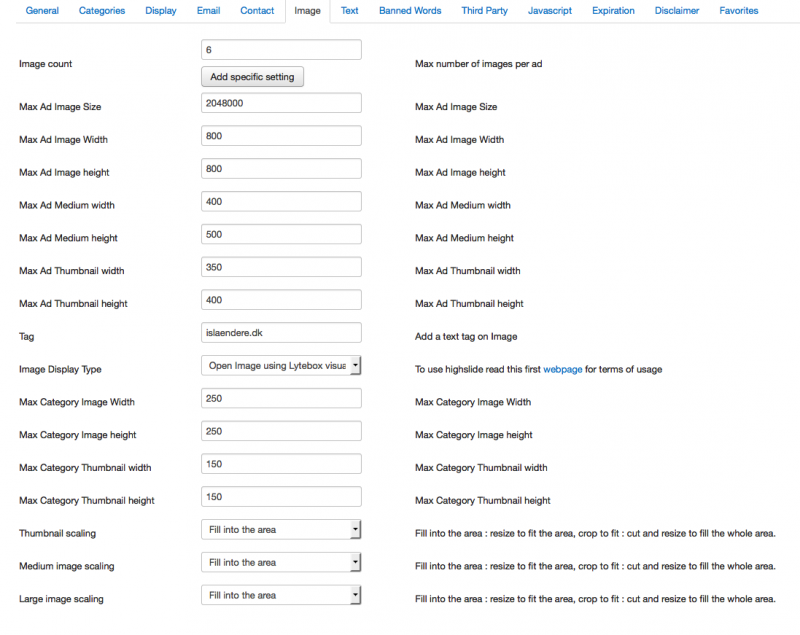
event though I set image size to bigger size, images would not appear larger in frontend.

see attached settings and see link here: islaendere.dk/gratis-annoncer
Attachments:
More
11 years 11 months ago #8182 by loic
Replied by loic on topic image size issue
Hello,

the large size is for when you click on a image if you don't use the jssor slider.

Also, the images already uploaded will keep their old size. You will need to reupload them to update their size.

Best regards.
More
11 years 11 months ago #8188 by jeannine
Replied by jeannine on topic image size issue
Hello,

tried to test by adding an ad with big image, still the popup image after clicking the image on detail ad view is as small as in ad detail view.

I also still experience the problem with error after deleting an add:

"1146
Table 'islaenderenu.isi_adsmanager_fieldgmap' doesn't exist SQL=DELETE FROM isi_adsmanager_fieldgmap WHERE contentid = 20"
More
11 years 11 months ago #8202 by loic
Replied by loic on topic image size issue
Hello,

For the error, it seems a table is missing in you database.

Try reinstalling the plugin gmap for AdsManager to fix this error.

Best regards.
More
11 years 11 months ago #8222 by jeannine
Replied by jeannine on topic image size issue
hello. can you provide link to download this plugin? I could not find under downloads. I actually do have installed xmap for adsmanager. I tried to install in backend, going to component adsmanager and plugin and tick the plugins, but get error 500 :-(

Also I need the youtube ability, tried to ad youtube field, but then the whole adsmanager did not work. Tried as well install youtube plugin by component, same error 500.

:dry: please help.
More
11 years 11 months ago #8245 by loic
Replied by loic on topic image size issue
Hello,

Could you execute this SQL request on your database ?
CREATE TABLE IF NOT EXISTS `isi_adsmanager_fieldgmap_conf` ( ".
			  "`fieldid` INT(10) UNSIGNED DEFAULT NULL, ".
			  "`map_width` INT(10) UNSIGNED DEFAULT '500', ".
			  "`map_height` INT(10) UNSIGNED DEFAULT '300', ".
		      "`list_map_width` INT(10) UNSIGNED DEFAULT '200', ".
			  "`list_map_height` INT(10) UNSIGNED DEFAULT '200', ".
			  "`lat` FLOAT DEFAULT '37.4419', ".
			  "`lng` FLOAT DEFAULT '-122.1419', ".
			  "`google_key` TEXT DEFAULT NULL, ".
			  "`zoom` INT(10) UNSIGNED DEFAULT 9, ".
			  "PRIMARY KEY  (`fieldid`) ".
			  "); 

If the problem is not resolved after that.
Could you send us FTP + admin account at support @ juloa.com (remove the spaces) ?

Best regards.
Time to create page: 0.058 seconds
Powered by Kunena Forum
